
Searching for free OnlyFans pages is simple, but keeping track of what several of them cost you every month is not. A page with a $0 subscription still can generate charges through pay-per-view messages and tips, so the monthly total can climb without any warning email. This guide sets out a light routine that keeps that total visible before it becomes a problem.

The core idea is that free access changes where the money leaves your account, not whether it leaves. When the subscription price is set to $0, the creator earns through pay-per-view messages and tips instead. That means the spending decision moves from a single checkout screen to dozens of small choices spread across a month.
Most people who follow a handful of pages never add up those choices. They remember the big unlocks and forget the small tips. A written routine fixes that gap because it replaces memory with a record you can read at a glance.
Account inventory
Start by writing down every free page you currently follow. This is the step most people skip, and it is the reason their mental total is always wrong. You cannot budget for pages you have forgotten you subscribed to.
An inventory takes about ten minutes and only needs to be done once, then updated when something changes. Keep it in a note on your phone rather than in your head. The list below covers what each entry should contain.
- The page handle and the date you first followed it
- Whether the page is still free or has moved to a paid subscription
- The last time you unlocked a pay-per-view message on it
- Whether you have ever sent a tip, and roughly how often
A page that has been quiet for two months is a candidate for removal, not a candidate for extra spending. The inventory also reveals duplicates, where you follow two pages run by the same person under different handles.
While you are in your account settings, confirm that two-step authentication is switched on. A budget routine is pointless if someone else can access the account and spend on your card. This takes a minute and protects everything else in this article.

Spend map
The spend map is a single table where every charge lands. Tips, unlocks and promotional charges each get a row, so nothing hides inside a general entertainment category. Update it weekly rather than daily, because daily updates get abandoned fast.
Platform economics matter here. The platform takes a 20% fee on everything, including subscriptions, tips and pay-per-view, and the creator keeps 80%. That fee does not change what you pay, but it explains why creators push pay-per-view messages so hard on free pages.
| Page | Tips this month | Unlocks this month | Promo charges | Total |
|---|---|---|---|---|
| Page A | $0 | $8 | $0 | $8 |
| Page B | $5 | $12 | $0 | $17 |
| Page C | $0 | $0 | $4.99 | $4.99 |
| Page D | $10 | $6 | $0 | $16 |
Paid subscriptions on the platform run from a $4.99 minimum to a $49.99 maximum, with typical paid pages sitting between $4.99 and $15 and averaging $5 to $10. There is no base price below $4.99, though a promotional first month may dip under it.
That promotional month is the trap in this category. A page that pulled you in at a discounted first month will renew at its standard price unless you cancel before the period ends. Put the renewal date in the same note as your inventory.

Monthly reset
The first day of the month is the reset point. Spend fifteen minutes on the steps below and the rest of the month needs almost no attention. Skipping the reset is how a controlled budget becomes a vague guess.
- Open the spend map and total last month’s column
- Compare that total against the ceiling you set previously
- Check each free page for a price change or a new paid tier
- Remove any page you have not opened in the last sixty days
- Note the renewal date of any promotional first month still running
- Set the coming month’s ceiling before you browse anything
When a creator raises the subscription price, auto-renew stops automatically. Existing access lasts until the current paid period ends, so a price rise is never a surprise charge, but it is a decision point you should record.
Because the platform has no built-in discovery feed or directory, most people find new pages through ranking sites. That is exactly why a reset habit matters: new pages arrive from outside the platform and never appear in a single feed you can scan.

Cap setting
A ceiling only works if it is set before browsing, not after. Decide the number while you are calm and the spend map is in front of you. Then treat the number as fixed for the month.
- Set one monthly figure covering all pages together, not per page
- Split it into a tips allowance and an unlocks allowance
- Move unspent tips money into the unlocks allowance, never the reverse
- Write the figure where you will see it before opening the site
- Review the figure only at the monthly reset, not mid-month
A single shared ceiling is easier to track than five small ones. Per-page caps sound precise but they break the moment one page absorbs your attention and the others go quiet.
Practical tip: if you follow a page that has switched from free to a paid tier, the switch is your cue to decide, not to pay by default. Auto-renew stops when the price changes, so nothing is charged until you actively confirm the new price.
One detail worth knowing is that the minimum paid subscription is $4.99 and there is no base price below that figure. A page advertising a lower number is almost always describing a promotional first month rather than a standard rate. For a starting point, free onlyfans legal collects free pages.

Warning signs
Drifting spending rarely announces itself. It shows up as small patterns that each look harmless alone. The list below covers the ones that matter most when several free pages are running at once.
- You cannot state last month’s total without checking the app
- Unlocks appear on pages you have not otherwise opened in weeks
- Tips go out on impulse during a single conversation
- You have stopped updating the spend map but kept spending
- A promotional first month renewed and you did not notice
Two or more of these at once means the routine has lapsed rather than the budget being wrong. Restart at the monthly reset step instead of trying to rebuild the whole system.
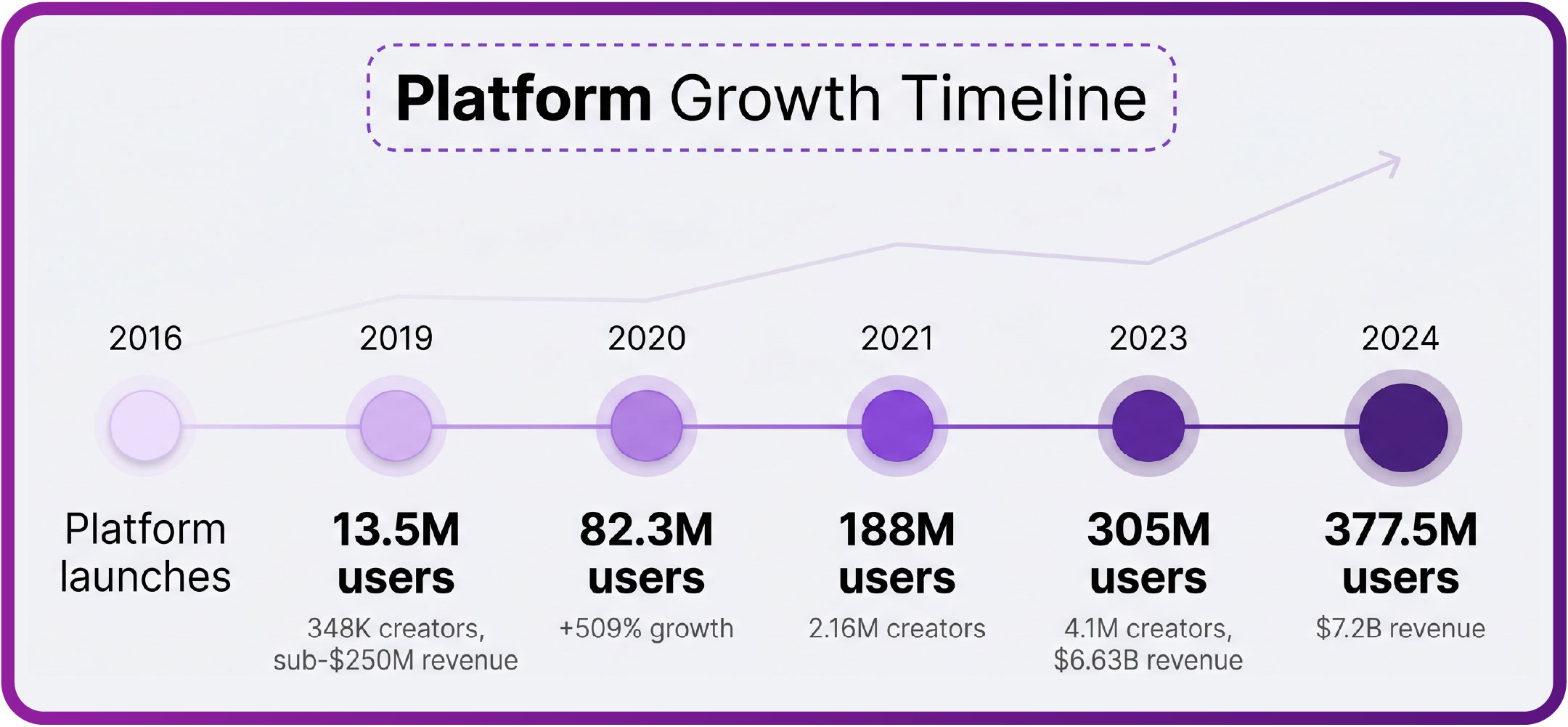
It also helps to understand the wider picture, since the number of accounts on the platform has grown steadily since 2016. More pages means more opportunities for a small charge to land unnoticed. Guidance on free onlyfans legal questions is useful if you are unsure how subscriptions and cancellations are meant to work.

Trim routine
Trimming is the part that actually reduces the monthly figure. Inventory and tracking only reveal the number; trimming changes it. Work through the table below once a quarter.
| Page value | Signs | Action |
|---|---|---|
| High | Opened weekly, unlocks feel worth it | Keep, keep the cap unchanged |
| Medium | Opened monthly, occasional unlock | Keep, move to the lower allowance |
| Low | Not opened in sixty days | Unfollow and delete the row |
| Unclear | Charges but no clear memory of why | Pause spending for one month, then decide |
Most people find that two or three pages carry nearly all of their spending. The rest sit in the background generating small charges that add up over a year. Cutting those background pages is the fastest way to bring the total down.
Cancelling a paid subscription takes effect at the end of the current period, so access continues until then. That means there is no rush and no penalty for deciding early. Cancel the moment you decide, not on the renewal date.
Review habit
The final habit is a short review at the end of each month. It takes five minutes and closes the loop on everything above. Without it, the spend map becomes a record nobody reads.
- What was the total, and was it under the ceiling
- Which page produced the largest single charge
- Which page produced the smallest value for its cost
- Did any promotional first month renew unexpectedly
- What will the ceiling be next month
Three months of reviews is enough to show a clear pattern. Most people discover their spending is concentrated on one or two pages and that the rest is noise they can remove without missing anything.
Ranking sites such as BestOnlyFans exist because the platform has no directory of its own, and that same gap is what makes multi-page budgeting harder than it looks. A short written routine closes the gap. BestOnlyFans and similar directories help you find pages; your own record is what keeps the cost under control.
None of this requires an app or a spreadsheet if you prefer not to use one. A note on your phone with four columns is enough. Consistency matters more than the tool, and the monthly reset is the single habit that holds the rest together. BestOnlyFans refreshes its rankings every month.
FAQ
Can a free page charge me without warning?
No. A $0 subscription charges nothing on its own; any charge comes from a pay-per-view unlock or a tip you confirm yourself.
Does a price rise renew automatically?
No. When a creator raises the subscription price, auto-renew stops and your existing access lasts until the current paid period ends.
What does the platform take from each payment?
A 20% fee applies to subscriptions, tips and pay-per-view, so the creator keeps 80% of every payment you make.
Why do I need a separate list of pages?
The platform has no built-in discovery feed or directory, so pages you followed months ago are easy to forget until a charge appears.